
There are numerous compressor pedals on the market and every multi-effect includes a compression effect. They are especially useful to get that “clicky” clean sound for country licks and funky rhythm parts or placed before a distortion to increase the sustain and fatten things a bit.
But I find they can also be very useful in recording situations especially when you cannot crank an amp or when you have to record direct. After all, compressors were not primarily invented to be guitar effects but they originated in the studio and are used in recording and mixing situations all the time, not only to avoid distortion but also to put forward some parts, smooth a bass line or increase the sustain of a guitar part, etc. The list of applications is endless.
So, a while ago, I was recording direct using my trusty Marshall JMP-1 preamp and I was using the clean channel with my pedal board laden with overdrive, distortion, delay, etc. in front of the preamp. I found the tone to be a bit static and unrealistic. I then decided to try using a compressor, a BOSS CS-3 modified with the Monte Allum opto plus mod, in the effect loop of the JMP-1. So yes that means that all my other effects were placed before the compressor kicked in.
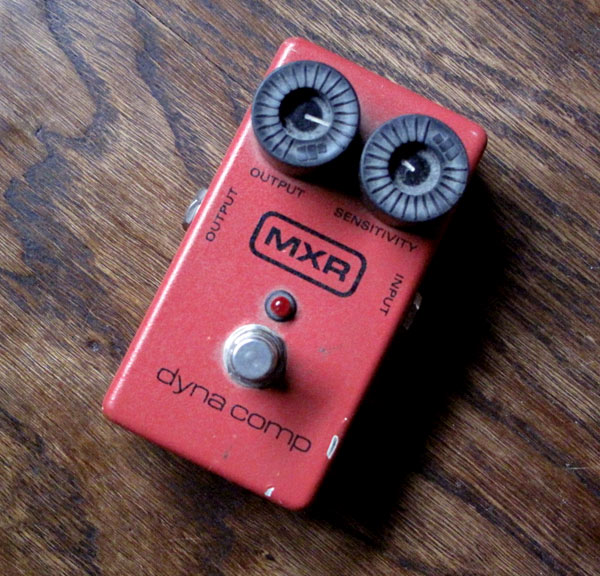
This is counter intuitive for guitarists as you are always told to put a compressor first in the chain but sometimes rules are meant to be broken. Note that some guitar compression pedals are not exactly studio grade so results may vary but I was quite satisfied reproducing the same trick with a standard MXR Dynacomp, the compressor of all guitar compressors (my model has nothing fancy, it is unmodified and was made in 95).
The resulting tone was more realistic and lively be it clean or colored by overdrive or distortion pedals. The difference is subtle but, to me, having a bit of compression at the end of the chain mimics the natural compression of a clean but loud tube amp.
I have recorded a demo using my Fender Stratocaster equipped with noiseless Kinman pickups, a RAT 2 distortion and a BOSS DD-3 Delay into a clean Marshall JMP-1 plugged directly into the sound-card (an EDIROL FA-66).
Here is the tone without the compressor:
This is not bad but not very smooth.
Now, here is the same tone with the MXR Dynacomp placed in the effect loop of the JMP-1 preamp. The effect loop level is set so that only 80% of the tone go through the compressor:
I find that it is smoother and has more sustain. I also find that harmonics come out better.
And here is the same configuration but this time with the effect loop set so that all the tone goes through the compressor:
Even smoother… The Dynacomp had the output on 3 o’clock and the sensitivity quite low, on 10 o’clock.
I have tried the same trick using a BOSS CS-3 with a Monte Allum modification:
The CS-3 had the following settings: Level at 3 o’clock, Tone at 10 o’clock, Attack at 10 o’clock and Sustain at 11 o’clock.
So girls and boys, just experiment and try to put that compressor at the end of the effect chain especially after a modeling or tube preamp if you record direct. I also suspect that a low volume amp could benefit from having a good compressor in the effect loop.

Hey Romain,
I thoroughly enjoy your tone tips on this site. I just recently acquired a DynaComp and I placed it in the effects loop like you did for these examples, because your tone was awesome and I really digged it. So I tried doing the same setup by putting it through the effects loop of my ADA MP-1. The thing I notice when I kick it on is that it drastically lowers the volume of playing. Is there anything that I could do different??? Any input would be great!!!
Hey, in chapter 3.5 of this manual: http://www.scribd.com/mobile/documents/328299
It says that the loop on the ADA MP-1 has an input gain as well as an output gain.
Have you tried modifying those?
Thank you so much for the in-depth article. It is clear you have done your bit of reading, studying, research, and experimentation, and I have enjoyed your articles with video and audio included – it is such a big help. Thanks to you, I will now be able to incorporate compression into my recordings with new understanding. You have a good way of explaining and thoroughly teaching the topic.
I wanted to add, that for some guitar players such as myself, the bit of compression can be tricky if you’re dealing in all digital. For instance, I use a Vox Tonelab ST, which is essentially an amp modeler. There are several interesting things here: The compression effect is included, but there is no specific order really, and I have not confirmed this, but I am sure since it is digital, that won’t be much of a difference. The other interesting thing here is that the Tonelab has a 12ax7 tube in it – which separates it from all the rest of the digital amp modelers out there. The tone is clearly superior.
The last thing that adds a twist to this is that I don’t use this with an amp; I run it direct into my computer via preamp audio interface and I use a DAW program with compression effects in which the order CAN be chosen and DOES make a difference.
It is interesting to note how different the sonic qualities can be when dealing with such a variety and combination of equipment. It is kind of mind boggling if you ask me!
Quite a common studio trick but in situations where you have better outboard you do that at the end of the channel or the pros do it at mixing time so it is not printed on the track. Even better if you can use tube compression/preamp to impart a bit of extra grit, in some situations where the original track was from a digital modeler, this actually could save the take.
Cool tip and an extra way to squeeze a bit more power from the old stombox compressor.